• A Different Standard

    This weekend marks the release of Pixar Animation’s thirteenth film, Brave. The anticipation is high for the story about a young princess in tenth century Scotland, and rightly so. Every one of Pixar’s previous films has been met with success on all fronts, from critical acclaim to box office results to Academy awards to the most basic of measurements, audience enjoyment. You would be hard pressed to find anyone of any age who didn’t enjoy at least one of Pixar’s stories. Like no other modern movie studio, Pixar can be counted on to deliver time and again.

    They’ve become so good that they are graded on a different curve than the rest of Hollywood. In his review of Brave for the LA Times, Kenneth Turan opens by saying, “If the Walt Disney Studios logo were the only one on Brave, this film’s impeccable visuals and valiant heroine would be enough to call it a success. But Brave is also a Pixar Animation Studios film, and that means it has to answer to a higher standard.” Even Cars, Pixar’s weakest film (in my opinion, though not the opinion of many a five-year old), was still better than most other movies. The question everyone is wondering is, how? How does Pixar succeed so well with every single movie, and why can’t anyone else?

    The strange thing is, Hollywood can’t seem to find an answer. Despite watching Pixar rake in enormous amounts of money (we’ll get to that soon), studios continue to produce remakes, adaptations (of boardgames), and sequels. How many times have you looked at the theater listings or scrolled through your Netflix options and turned away in dismay because there was nothing interesting or new to watch? I am to an extent generalizing, because there are legitimately good movies out there, but the average temperature of reaction to Hollywood’s offerings is tepid at best.

    There are very smart people working in Hollywood, don’t get me wrong. It just seems bizarre to me that no one else can get it right. Geoff Boucher, writing for LA Times’ “Hero Complex”, put the question to Brad Bird in an interview a few months ago.

    GB: Pixar is widely admired but, really, rarely copied. Why do you think that is?

    BB:  Everyone in Hollywood says they wish they could do it like Pixar, but they really don’t. There’s no secret at Pixar, but there is a belief in letting people pursue something with passion and take chances, and most of Hollywood, really, doesn’t like that. It’s too scary. Some studio executives will say they love obsessive creators who take risks, but really most of them would rather play it safe. Projects cost a lot of money and people would rather follow patterns they know and make things safe and accessible. Hollywood wants there to be a math formula for making hit films. To make something really great and different and interesting means taking risks and following these ideas in your head.

    Reading this interview, it suddenly clicked for me why Pixar does so well, and it’s summed up in this sentence from Brad: “Projects cost a lot of money and people would rather follow patterns they know and make things safe and accessible.”

    The pressure of financial obligation in Hollywood is stifling creativity.

    Money, Money, Money

    The reason studios can’t take the risks Brad is talking about is their budgets are enormous. It’s no shock these days to hear about studios spending $200M (million) on a film. When you’re spending that kind of money on something, you had better be sure you’re going to make that money back. So studios stick with the safe bets, the works that have a pre-established audience (like Twilight, The Hunger Games, and comic books). They stick with ideas they know can sell—which results in unoriginal rehashes of what worked last year.

    The need for financial success is especially true in today’s changing market. Due to accessible equipment and the internet as a viable distribution method for independent filmmakers, the amount of content has skyrocketed. Thus the $100M spent on movies by audiences is split between 100 films instead of twenty. If you’re going to spend $200M on a movie these days, you really have to know something is a sure bet before you make it.

    For example, John Carter was recently made for $250M. It’s domestic box office gross was $73M. The international box office increased that to $282M, so they fortunately made back their budget, but numbers like that would freak me out if I were a studio executive. That can only happen so many times before you file for bankruptcy, such as New Line Cinema did shortly after releasing The Golden Compass for $180M but only grossing $70M domestically. Things like this only drive studios farther into their shells of comfortability. When you invest that much money in something, there is enormous pressure to earn that money back—which means you stick with what you know works.

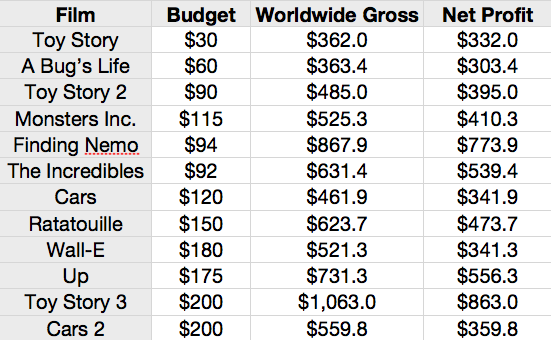
    By contrast, let’s look at the numbers for Pixar’s films:

    Numbers in the millions. Compiled from Wikipedia.

    After doing some math, here’s what we can learn from these numbers:

    • Average budget: $125.5M
    • Average worldwide gross: $599.6M
    • Average profit: $474.1M

    Other studios would give anything to have those numbers. Now, granted, the costs for a live-action film are going to be different from an animated film. You’re not just paying animators and voice actors. But the point is, you don’t have to spend $200M to make a great movie. Despite what Hollywood thinks, lots of money ≠ a great movie. (One more point of comparison: The Hunger Games was made for $78M, and its worldwide gross was $661M.)

    The average budget for the first six Pixar films was $80M. The costs even went down after Monsters IncYou could argue that Finding Nemo was cheaper because the story was set in the ocean and didn’t need as much set decoration—but then The Incredibles was even cheaper, even with big action pieces and lots of characters.

    The average profit for those first six films? $459M.

    These numbers are important because we can see a consistent choice by Pixar to keep budgets small as they started out. This meant they could take greater risks with their stories. The smaller budgets gave them the freedom to try new things and figure out how to be a movie studio, how to function as a creative team, and how to consistently develop good stories.

    And that, I believe, is the crux of it all: at Pixar, story is king. They are not slaves to their budgets. There will always be budget concerns, of course, but with lower budgets Pixar is able to try new things. A story about an ant? Why not? It’s only $60M. A story about a superhero family? Sure, it’s only $92M.

    By keeping costs low, Pixar has been able to let the story lead the way. Even to the extent of making massive revisions to films, like Toy Story 2 and Ratatouille, the story is king, not the money, because when money dictates your creative decisions you stick with what’s safe.

    Having succeeded with its first six films, Pixar was then able to increase the budgets for the next six. The average budget of films seven through twelve was $171M; the average net profit was $489.3M. But even though budgets increased, by that time the ratio of budget to available income was probably close to the same as the earlier films. By then they had a sufficient amount of profit to still allow for creative freedom.

    Three Lessons

    Having looked at all of this, I think three of things (among many) to which we can attribute Pixar’s success are:

    1. Smaller budgets. By removing some of the pressure of succeeding financially, they were able to foster creative freedom and originality.
    2. Family-oriented films. It’s statistically proven that family-friendly films make more money. On top of that, China and India are two of the biggest markets in the world, and I heard recently that one of them (I can’t remember which) doesn’t accept movies over a PG-rating. So you cut out a significant chunk of potential audiences by merely putting violent, sexual, or foul content into your films. Now sometimes a story legitimately calls for some (key word) of that, such as The Passion of the Christ or Saving Private Ryan. But as Ted Baehr said, “Most people want to see Good conquer evil, Truth triumph over falsehood, Justice prevail over injustice, Liberty conquer tyranny, and Beauty overcome ugliness […] They also would like to take their whole family, including their grandparents, to the movies more often.”
    3. Story is king. By giving the story the best seat in the house instead of money, Pixar is able to maintain integrity in the vision and not make compromises to follow where someone thinks the market is going.

    The temptation Pixar will have to fight is the thinking that technology and effects is making the money. They have to resist the idea that movies can be made by formula and sticking with what worked last time.

    At the same time, other studios can’t just replicate verbatim what Pixar has done. Pixar’s mode of operation is giving creativity and originality full reign, and by definition originality means it will always be different. What Hollywood needs to do is look at the principles of Pixar’s process and let those ideas develop how they will in their particular environment.

    Story must be King

    Audiences—no, humanity—loves creativity and fresh ideas, and that is spoiled by sedimentary thinking—which is pressured into place by exorbitant amounts of money and the pressure to succeed that comes with it. As Brad said, “To make something really great and different and interesting means taking risks and following these ideas in your head.” And that means not having the pressure of money.

    So don’t give me $200M. I don’t need it to make a great movie, and I don’t want you breathing down my neck to see if we make back the money.

    Actually, wait—I take that back. Give me $200M and I’ll make four great movies.

  • If you came here looking for a list of the five best productivity apps, I’m afraid you’ll be disappointed. There are a thousands articles like that online and you don’t need another one. Instead, this article is about how to choose the best app.

    Kenny Miracle, a friend and fellow editor, recently asked me if I had found any good productivity apps. As the manager of a small editing team, I’ve looked into my fair share of project management apps, so I started thinking of some suggestions. The longer I thought about it, though, the more I realized that as I rejected certain apps and liked others I was actually following an unstated set of criteria. By defining that criteria, I was able to specify what I wanted and didn’t want in an app—and thus didn’t have to rely on the ambiguous “it just feels right.” Once you determine your wants and needs for an app, you can be more deliberate in choosing in the tools you use.

    First, a disclaimer: “productivity apps” is a huge field. It could be to-do apps, note apps, finance, word processing—anything that helps you get things done. Most of my thoughts revolve around to-do apps, I think.

    There are two categories of apps at which I’ve looked: ones for personal productivity and ones for managing projects in the edit suites. I have different requirements for both.

    Personal Apps

    After looking at many to-do apps, here are the things I found myself looking for every time I launched something new:

    1. Good design. I don’t want a lot of clutter getting in the way. I want to clearly see what I need to do and be able to navigate the app in a simple and intuitive way that lets the content be the main focus—not trying to figure out how work the thing. (What good design means will differ from person to person.)
    2. Multiple lists. I like to organize things based on projects. Rather than have one giant list where everything from “fold laundry” to “archive latest freelance project” is jumbled together, it’s helpful to have separate lists for separate areas of life.
    3. The option of a due date. Sometimes things need to be done by a certain time, but often they don’t. I just want to remember to write a check for rent at some point tonight. Because of that reason, using, for example, the calendar app on an iPhone doesn’t work because a calendar is all based around dates and times. Sure, I could just put in a random time, but then a few more clicks are required and I’m having to work around the app rather than it help me.
    4. Reminders. On my old phone (I recently got an iPhone. Woo-hoo!) whenever I had things on my calendar (which I used more as a to-do list than a date/time scheduler) a little calendar icon showed up on the screen. Things like that would bug me because it was cluttering up my screen, so I used that as a reminder to look at the calendar. So if I’m going to use an app, it needs to give a visual reminder that catches my eye whenever I look at it.

    Personal apps that I’ve found helpful are:

    • I’ve only had an iPhone for a few days and so far I’ve only tried out Reminders as a to-do list. It meets most my criteria except a badge for a reminder badge. Others worth mentioned are Wunderlist (you can make different lists and the design is great); TeuxDeux is an app that my brain just gets with fantastic design, but you can’t have multiple lists or due dates; Due isn’t specifically a to-do app, but it’s an app  I’m seriously considering because it has reminder badges and great design. Lastly, Any.Do is fantastic in just about all aspects: it has fantastic design, optional due dates, and multiple folders. There are of course the big ones like Things and Omnifocus, but for me they seem too robust and thus would take too much energy to navigate.
    • For note-taking (as a writer I jot down a lot of things) I really like Simplenote. The design is great, it’s easy to sort notes by tagging, and I can access it online in a fantastically designed editor. The only other one I’ve tried is Evernote but the design has always slowed me down, so I stick with Simplenote because it’s, well, simple. Other apps I’ve heard good things about but haven’t used are iA Writer, Byword, and Drafts.
    • Other apps I use are Pocket and Instapaper for saving articles to read later, and SugarSync and Dropbox (SugarSync I use to sync personal documents between home desktop and laptop, and Dropbox is my terribly organized bucket for anything random that I need between work and home).

    Project Management

    For project managing apps, I tried a few different ones and realized there was again a list of criteria—but slightly different based on the context—that an app needed to meet for it to help our editing team.

    1. Good design. Again, we have things to do. We want something that doesn’t take brain power away from getting things done. What this means will change for everyone, but I think it’s important to use something that makes sense to you. Your brain gets it and you can move beyond spending energy on using the app to actually getting things done.
    2. Due dates. With projects, you need to be able to assign deadlines, and those deadlines need to be visible and obvious. Reminders are helpful.
    3. Ability to assign projects and have those projects show up in an organized manner for the worker.
    4. Track time for specific tasks.
    5. Give description and notes about a project.
    6. See an overview of all projects (for manager).
    7. Printable project report with current status, hours, and due dates.

    Earlier this year I tried several different ones. First was Wunderkit, a more robust to-do app from the makers of Wunderlist. However, at the time I used it I couldn’t assign projects (you could assign individual tasks but not whole to-do lists). There also wasn’t a space I could go to and easily the projects to which I was assigned. Lastly, there wasn’t a way to print out project reports, which I really need for meetings with my supervisors.

    A few web apps that I looked at were Huddle, Freedcamp, and Asana (which I actually quite liked, but wasn’t robust enough for our team environment. The big names are Basecamp and Salesforce, but both were so big I didn’t know where to begin and they felt like overkill for our small team. All the apps I looked at didn’t fit one or more of my criteria (I was still building the list while I was looking). Eventually I found an app called TeamLab, which our team is now using. The design is decent and it’s easy to find your way to the list of current projects and to what you’re assigned. You can track time, set due dates, and assign projects as well as tasks. It doesn’t give the best printable project report, so we using Google Docs to keep our media director and projet manager up to date. With its expansion into Google Drive, it’s looking like we’re going to take more advantage of that platform.

    Clarify what you need

    Here’s what I’ve learned out of all this: figure out what you need and want an app to do, and then look for something that does that. It’s important to have a list because it clarifies what you’re trying to find. If you don’t have a clear idea of what you need, you’ll look and look until you find something “that feels right”. Asking yourself why certain apps feel right and why others don’t will help clarify what you like and dislike, and will then help you be more intentional as you look.

    The main thing is to find tools that work well with how you think. When I go to meetings, I now carry a thin Moleskine journal and jot down notes, because it’s portable, simple in its design, and writing is second-nature to me and I can think instead about what’s being said.

    That’s what a good productivity tool should be all about: something that manages the details so you can spend your limited energy on what you need to do.

  • Tell me if this sounds like you: you’re sitting there, working away, when suddenly you hit a wall. You get stumped. You have to answer a question, figure something out, solve a problem. It’ll take work and some deep thinking. But… instead of expending that energy, you decide it’s way easier to flip over to Facebook or your favorite news site and peruse for a while. Just a quick breather and you’ll get back to that problem.

    If you’re anything like me, you know exactly what I’m talking about. I’ll be the first to admit that I find the internet really fun to surf. At once a fantastic tool and a frustrating annoyance, the instant accessibility of anything but what I’m working on is too much to resist most times. Yet I’ve come to realize that I use the internet during my work day not as a tool to further my craft but as a way to avoid creative work.

    Not just hard work, mind you. I actually enjoy hard work. It makes the day go by fast, and there’s nothing quite like the feeling of heading home with the knowledge that I worked hard and accomplished things. But often I find myself coming up against a wall creatively—times when I have to figure out how to animate something, how to piece together a content edit, or simply reply to an email that requires thought—and instead of pushing through the block I run away from it. I go away and do something else until the necessity of deadlines and responsibility forces me to address the issue.

    The problem with that is I’m training myself in the wrong habit. The way an artist grows creatively is to face those walls, not run away. It’s by overcoming those walls that I learn how to do things, that I expand my ability to problem-solve. Once that muscle is strong and becomes second nature, I can move on from merely overcoming the problem and into the realm of taking my creative solutions a level or two higher.

    Things are busy right now in the IHOP-KC edit suites. Deadlines are looming, projects are piling, the staff is small—and those are just things at work. My outside life is full of activities and projects I want to complete. If I want to be a professional novelist and screenwriter, I have to write every day; I can’t wait for inspiration to strike. I can’t afford to run away.

    So today at work I made a distinct choice to stop running from the problems. I made a list of the things I needed to do and worked until I checked each of them off. Every time the urge came to check Facebook I shook my head and told myself, “There are more important things to do. Keep going.” And I got things done.

    A lot in the American life is about saying yes to every desire. “I want chocolate!” is quickly followed by a trip to Walmart. A yearning for entertainment is silenced by popping up Netflix or YouTube. We pride ourselves that the American dream is instant gratification of any want, but the downside is that we can no longer say no, even when we know we have important things to do.

    It comes down to training myself in the little things. I have to train myself to do the opposite of what my body wants. When the alarm goes off in the morning, I have to get up right away. When I’m typing on my computer late at night and I crave the chocolate-covered, peanut butter-filled pretzels in my fridge, I have to say no. Those choices will strengthen my muscle, and when I hit that creative wall at work or when I don’t want to write and would rather read, I’ll be able to keep going.

    One final note: I can’t win by myself. It would be easy to think that with my own strength I can master my propensity for distraction and wanting the easy way out. But a broken person can’t fix his brokenness. I need something stronger and unbroken to fix me. If I want to continue to say no to distraction, I ultimately need Jesus. I need his Spirit living in me, helping me say no to what my body wants and yes to what he’s called me to be.

    Tomorrow I’ll go into work and make a list of the things I need to do. I’ll take a breath and ask Jesus to give me strength. And I’ll get things done.

  • The internet is being flooded right now with thoughts on NAB 2012. It was my first time attending the show, so in the interest of helping other first-timers, here are my thoughts on how I planned my trip, what actually happened while I was there, and things that have stuck in my mind since returning home.

    Planning

    I lead a team of four editors at the International House of Prayer, in Kansas City, MO, so deciding what to look for while at NAB required that I analyze the state of our edit suites. I determined that the three areas I wanted to focus on were editing software, asset management, and storage.

    The next thing I did was scour the NAB website for free sessions to attend. The Post-Pit hosted sessions the whole week, and NAB itself offered a few open sessions. If any of them remotely sounded interesting, I added them to the NAB iPhone app. The app had a calendar function which was really helpful in scheduling sessions I wanted to attend, and it gave me a visual schedule of when things were happening.

    I made a list of vendors I knew I wanted to check out (Adobe, Autodesk, Canon, etc.) and noted where their booths were. NAB also sent out emails leading up to the show that highlighted different vendors and sessions, and if something looked interesting I added it to the list.

    The Show

    I spent the first day getting “the lay of the land”. The convention center is massive, and it took me most of the day to figure out where things were and how to navigate through all the booths. I visited several vendors and picked up schedules of their demos.

    Almost as soon as I arrived, I started ignoring my well-planned schedule. At first I felt a bit guilty, but I reminded myself that these things were just to give me structure. If I found something else more interesting, I gave myself the liberty to stick with it. Of course, at a show like NAB you could easily get distracted, and that’s where those three areas came into play. They provided a general focus for the trip, which kept me from getting lost down bunny trails, but I also gave myself freedom to explore and stay with what interested me.

    One quick tip: get a Monorail pass. It’s the simplest and fastest way to get up and down the strip. If you get a room in a hotel that connects right to it, even better.

    Booths & Sessions

    My favorite booths were by Manhattan Edit Workshop and Adobe.

    MEW offered training for all the editing platforms, and I quickly signed up for Avid, Premiere, and Final Cut Pro X workshops (note: before the show). The instructors at the booth were awesome and everyone was willing and open to have talk. I missed the workshop for FCPX but I dropped by later and had a great conversation with two of the instructors. They also hosted a Q&A session with Michael Tronick, the editor of Act of Valor. It was fascinating to hear Michael talk, and he also was very open to talking. Much thanks to MEW for hosting that event.

    Adobe’s booth was unbelievably awesome. Not only were they demonstrating the newly announced Creative Suite 6, but most of the demos were done by people using the software in their projects. I could have stayed at the Adobe booth the whole time, not just seeing a new piece of software but also learning how to use it and how to better tell stories. A large crowd was always clustered around the booth.

    Other notable booths were Autodesk and their presentation of Smoke 2013; the guys at Small Tree were really open to questions and explaining how their products work; Canon had all of their cameras set up, with sets and actors to test things out; and Avid also did presentations all day.

    I was also able to meet with a few people I’ve connected with on Twitter. Walter Biscardi was incredibly generous with his time and even bought me some hot chocolate; I chatted with Shane Ross while he was demoing at the AJA booth; and Chris Weatherly was a fellow church-creative that I had a good chat with. If you know people from Twitter will be at NAB, send them a message and see if they have time to meet up.

    One thing that I found helpful when meeting people was to have some something to talk about. We all know how awkward it is to walk up to someone and say, “Hey, thanks for your tutorials! Uh… well… yep, thanks! Okay, bye.” I found it really helpful to think of some topics to talk about before meeting. With Walter I asked about managing editors and projects, and with Chris it was talking about what he did for his church and me working at IHOP-KC. Just like the entire NAB trip, planning beforehand what I want to talk about really helped in making those meet-ups not less awkward.

    A quick word about sessions: I paid to attend a breakfast Tuesday morning, only to discover that it was an awards ceremony for vendors. I had a good conversation with people from ARRI, but I felt a little out of place since I wasn’t there with a product. If you’re paying to attend something, make sure it’s what you think it is.

    Thoughts on my Three Areas of Focus:

    Editing Software. Since the infamous announcement of Final Cut Pro X at NAB 2012, I have been thinking about what our edit suites will do in terms of software. Part of my goal at NAB was to look at Avid, Adobe, and Autodesk to see if they were viable options for our edit suites as we move on from Final Cut Pro 7.

    I attended a session at the Avid booth and also a workshop at the MEW booth. I have never fully edited on Avid, but as most of the industry can attest to, it looks like a solid NLE. However, having seen the new version of Premiere Pro, I’m pretty sure our edit suites will be switching to Adobe. Adobe has fixed just about all of the little things I never liked about Premiere, and its functionality within itself and within the entire Production Premium suite is awesome. We already need to upgrade to After Effects CS6 (we’re still on CS4), which means we’ll have Premiere installed as well, and I think the learning curve going from FCP to Premiere will be easier than to Avid or FCPX.

    I would have loved to try out Final Cut Pro X or seen demos of it, but as usual Apple wasn’t at the event. There are stories of people using FCPX for tv shows and I would love to see how they are doing it—but they weren’t at NAB. I don’t understand how a company can say they are invested in the professional market when they aren’t at the trade show of the year. Perhaps solely for lack of interaction with FCPX, we will be switching to Premiere Pro.

    In regards to Autodesk Smoke, it looks like a really powerful program. While talking to Walter, he said he’s pretty sure his five staff editors will be Smoke editors and finishers. However, I don’t think it will work for our edit suites. First off, we would still need After Effects, as my understanding of Smoke 2013 is that it’s mostly a compositing program. Also, I think it’s just more horsepower than we need or our budget can handle.

    Asset Management. The only booth I ended up talking to was CatDV, the generally accepted leader for asset management. While my first reaction is that here is again something with more horsepower than we need, I think it’s possible we can install a stripped down version of CatDV and do what we need it to do. Fellow editor Kenny Miracle also discovered 5thKind, who has developed a way of managing assets in the cloud, with some great ways for producers to review footage. There is also the long-hand way that Walter described to me, which is keeping track of everything in FileMaker Pro. For our purposes, I think I’ll be looking into a version of CatDV.

    Storage. I talked with the guys at Active Storage and Small Tree, and both sound like great options. Small Tree was really easy to talk to and they’ve figured out a great way to keep things simple and expandable. If our edit suites were starting today, I think I’d seriously consider Small Tree. For a more in-depth look at SAN storage, check out this post by David Gagne, our system admin.

    The Travesty of Women

    Being a first-timer to a trade show like this, I was also surprised, and then devastated, by the (in)famous use of “booth babes”. You could tell that these girls didn’t know a thing about the products; they were simply there to look sexy and get your attention, scan your badge, and get you into the booth. I passed one booth that was demoing cameras and green screens and the girl modeling at the news desk was leaning forward with a very low-cut top. There was absolutely no reason she needed to show that much cleavage—except to attract the men.

    Imagine if I had a booth at NAB and as my camera model I used a severely disabled quadriplegic guy. I put him on display and he slobbered, moaned, and was so disfigured that you couldn’t help but look. The outrage at that abuse would be overwhelming! “How dare you abusively use someone like that to make a profit!” would be the response.

    We are doing the same thing with women. Men like looking at girls so we ignore the abuse, but it’s the same thing. We do it with our test footage, we do it with our marketing, we do it at our booths to attract attention. It’s blatant and it’s shameless—and it’s atrocious.

    The society that uses women to sell its products will soon move to selling the women themselves.

    Final Thoughts

    In conclusion, I’m thankful I went to the show. I had great conversations and got to see first-hand how programs are used. I returned home tired and sore from all the walking, but also excited and inspired to tell stories and use the latest technology to do it.

    Hopefully I’ll get to go next year and build on what I learned this year.

  • Episode 3: Dialogue and Short Film Financing

    Pat and I talk about writing believable dialogue, raising finances for a short film, and updates on our current creative projects. You can listen here.

I’m Jesse

Reading, writing, fantasy, adventure, movies—it’s all been my favorite since I was 8 years old. If you enjoy reading fantasy, adventure fiction, and screenwriting, then you’re in the right place!

Let’s connect